Short answer
A Mac can connect to two pairs of AirPods at the same time, but it only plays sound on one of them. The free way to use both is a Multi-Output Device in Audio MIDI Setup. Tonebar does it with a tick box, gives each pair its own volume, and can send a single app to a different device.
Why it happens
macOS sends sound to one output at a time. You can have two pairs of AirPods connected over Bluetooth, but only the one picked in Control Center plays.
An iPhone or iPad can share audio with a second pair of AirPods. macOS has no Share Audio button, so on a Mac you need a workaround. It comes up when two people want to watch a film on a laptop, on a plane or late at night, or when you want AirPods and a speaker playing together.
First, connect both pairs
- Connect the first pair as usual, from Control Center → Sound or System Settings → Bluetooth.
- Put the second pair in pairing mode. On most AirPods, open the case and hold the button on the back until the light flashes white.
- In System Settings → Bluetooth, click Connect next to the second pair.
Both pairs should now show as connected. Next, make them play together.
Fix it for free: a Multi-Output Device
Audio MIDI Setup is a free app that comes with every Mac. It can combine outputs into one.
- Open Finder → Applications → Utilities → Audio MIDI Setup, or search for it with Spotlight.
- Click the + button at the bottom left and choose Create Multi-Output Device.
- Tick both pairs of AirPods, or your AirPods and a speaker.
- Choose one of them as the Primary Device, and tick Drift Correction for the others.
- Open System Settings → Sound → Output and select Multi-Output Device.
- No volume control. macOS has no volume slider for a Multi-Output Device, so the volume keys and the Control Center slider stop working. There's no per-device volume either.
- No microphone. It's for listening only.
- It's fiddly to repeat. If one pair disconnects, you may need to switch back to the Multi-Output Device again.
- Bluetooth devices can be slightly out of sync with each other. This is true for any method.
Send one app to a different device
Sometimes you want different sound on different devices, not the same sound twice. For example, Zoom in your AirPods while music plays on the speakers.
For free, some call apps let you pick their own speaker. In Zoom it's Settings → Audio → Speaker. In Microsoft Teams it's Settings → Devices. Most other apps just follow the Mac's output.
The one-click fix
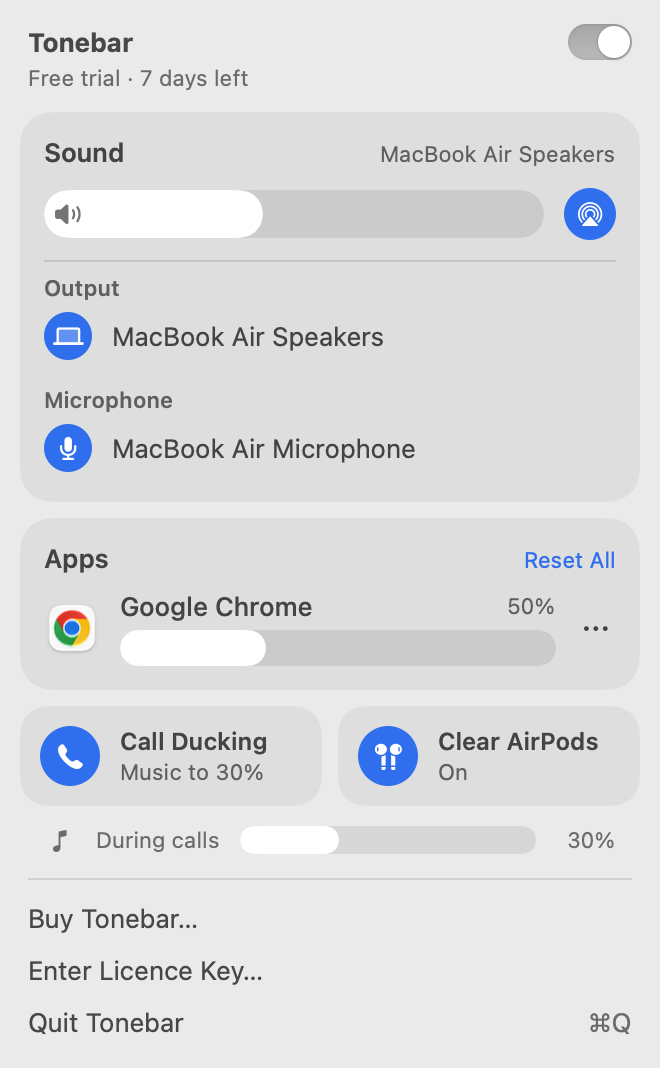
Tonebar puts all of this in its menu, with a volume for each device.
Play on two pairs of AirPods
- Connect both pairs, as above.
- Open the Tonebar menu and click the device button in the Sound tile.
- Turn on Play on several at once, then tick two or more devices.
Each device keeps its own volume, so one person can listen louder than the other. It works for two pairs of AirPods, or AirPods and a speaker.
Send one app somewhere else
Click the … button next to an app in the Apps tile, choose Play on, and pick a device. Choose Same as Mac to send it back to the main output.
As with every method, Bluetooth devices can be slightly out of sync with each other.
Two pairs of AirPods, one Mac
Tonebar plays on several devices at once, with a volume for each, and no Audio MIDI Setup.
One-time purchase for up to 3 of your Macs. 30-day refund. macOS 14.4 or later.
Related guides
- Why AirPods sound bad on calls on a MacAirPods go flat and muffled on Zoom, Teams and FaceTime. Here's the cause, the free fix and the automatic one.
- How to change the volume of each app on a MacmacOS has one volume for everything. How to get a volume mixer like Windows has.
- Mac volume greyed out on an HDMI monitorWhy macOS can't change your monitor's volume, and how to get the volume keys working.
- All Tonebar featuresEverything Tonebar does, with how to use each part.
Questions
Can a Mac connect to two pairs of AirPods at once?
Yes, both can be connected over Bluetooth. By default the Mac plays on only one, so you need a Multi-Output Device in Audio MIDI Setup, or an app like Tonebar, to play on both.
Can each pair have its own volume?
Not with a Multi-Output Device, which has no volume control. With Tonebar, each device keeps its own volume.
Will the two pairs be in sync?
Bluetooth devices can be slightly out of sync with each other, whichever method you use.
Can I use AirPods and a speaker at the same time?
Yes. Both methods work with any mix of outputs your Mac can see, such as AirPods and a Bluetooth speaker, or AirPods and the Mac's own speakers.
Can both people use their AirPods microphone?
No. macOS uses one microphone at a time. Playing on two devices is for listening.